Results are made to be filed, not compared
Blood test results usually arrive as a PDF in your email, a printout from your GP, or a page in a lab portal you rarely log into. Each report stands alone. Comparing this test with the one six months ago means opening two files and reading line by line.
What getting them in should look like
A good import should do the boring part for you:
- Read every marker: name, value, unit and the lab's reference range.
- Pick up the test date, so the result lands in the right place on your timeline.
- Let you check before saving. You confirm the values; nothing is stored until you do.
- Flag what's outside the lab's range, so it's easy to see what to ask about.
Photos work too
Not every result comes as a PDF. A clear, well-lit photo of a printed report can be read as well. Lay the page flat, avoid shadows and make sure the whole table is in the shot.
Then it becomes a trend
Once two or three tests are in, each marker gets its own line over time. That's when results become useful: you can see direction, not just one number, and what changed between tests.
Where the app comes in
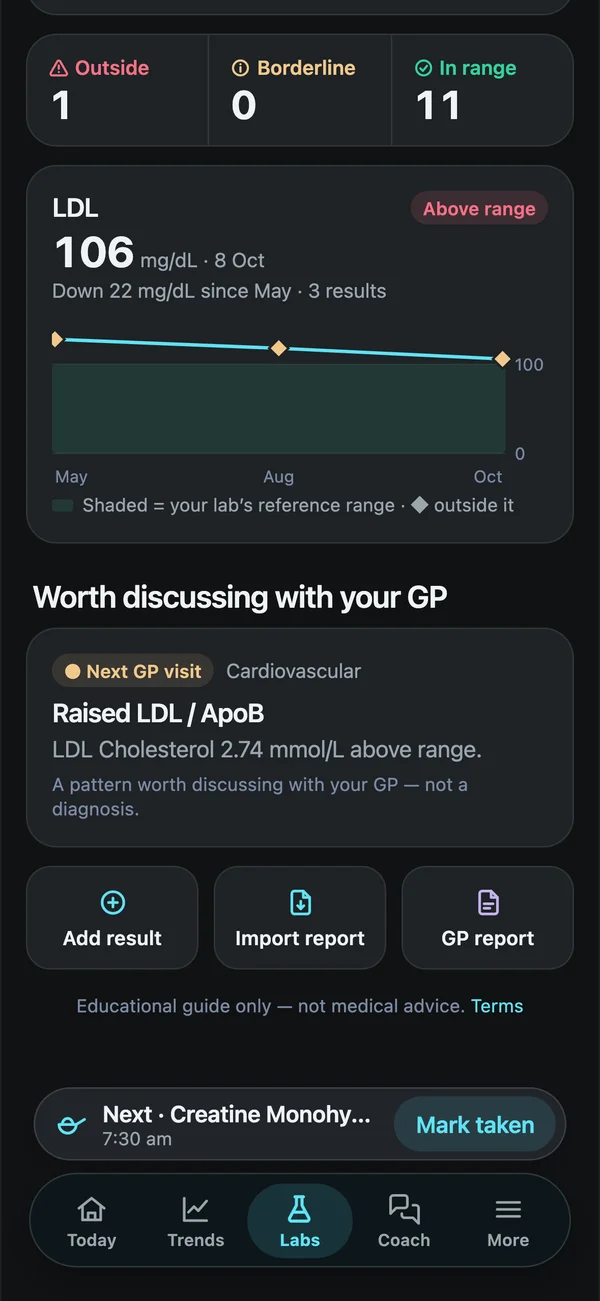
In Biohack Tracker you open Labs, tap Import full report and choose your PDF, or upload a photo of the page. The app extracts every marker, value, unit and reference range, fills in the test date, and you confirm before saving. Each marker then joins its trend chart, next to every test before it. You can also see what's changed since your last panel and create a one-page summary for your GP.
